Local SEO — Open Dental Cloud vs On‑Prem in Houston: Security, Speed & Support
Open Dental Cloud vs On‑Prem: Security, Speed, and Support Tradeoffs
Choosing how to host Open Dental isn’t just an IT preference—it’s a practical call with daily workflow consequences. In Houston, many practices are weighing Open Dental cloud vs on‑prem because HIPAA security, imaging speed, and reliable remote access all matter in real time. Below is a balanced, HIPAA‑aware comparison to help your team decide, with clear tradeoffs, Houston‑specific bandwidth realities, and how CompTSS supports either model with 24/7 monitoring, automated encrypted backups, and fast local response.
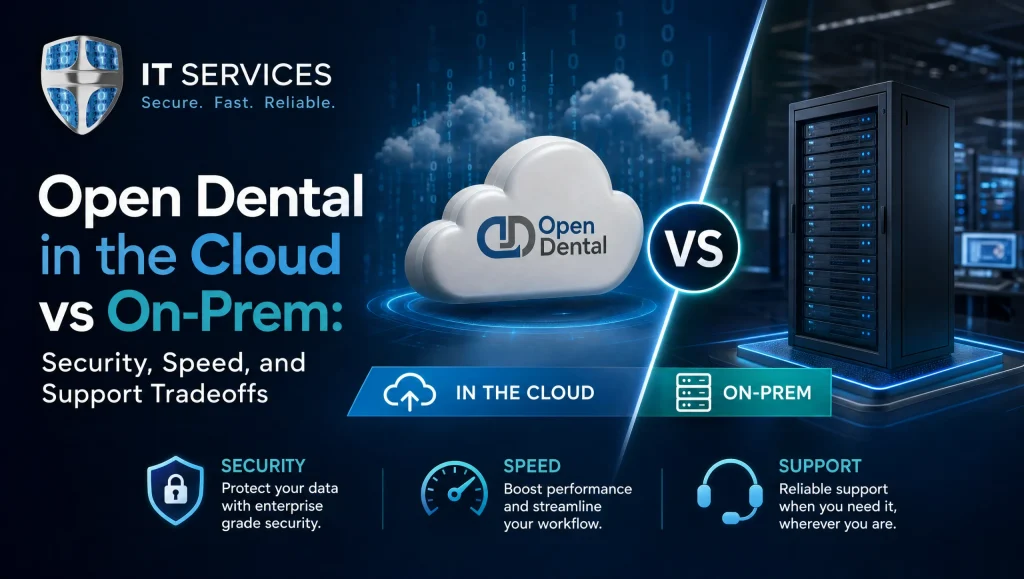
Recommended image alt: Open Dental cloud vs on‑prem comparison for Houston dental practices
Quick Take: Open Dental Cloud vs On‑Prem in One Minute
Definition
- Cloud hosting: Open Dental runs on secure, remotely hosted servers (public or private cloud) you reach over the internet. Centralized updates, simpler remote work, and elastic resources make it easy to grow without juggling hardware.
- On‑prem server: Open Dental runs on a server inside your office. You control the hardware and local network, which can deliver ultra‑low latency for chairside imaging if tuned correctly.
Who Typically Chooses Each
- Cloud: Multi‑location groups, providers rotating between offices, teams with consistent bandwidth, and owners who prefer predictable OPEX over periodic hardware replacement cycles.
- On‑prem: Single‑location offices; heavy imaging environments (Dexis, Sidexis/Sirona, CBCT/3D) that need truly snappy chairside performance; and locations with limited upload bandwidth.
- Hybrid: A practical best‑of‑both—keep imaging servers and large files local while hosting Open Dental or remote desktops in the cloud for secure access from anywhere.
Security & HIPAA: What Changes Between Cloud and On‑Prem
Access Controls and MFA for Remote Access Security
- Cloud: Typically integrates cleanly with MFA and role‑based access for staff working from home or across offices. Centralized policies are simpler to standardize and enforce.
- On‑prem: Secure remote access is absolutely achievable; it just requires disciplined setup—VPN or properly hardened remote desktop gateways, strict policies, and MFA across accounts.
Encryption in Transit and at Rest; Email Filtering; Patch Management
- Both models can meet HIPAA with the right controls:
- Encryption in transit (TLS/HTTPS) and at rest on servers and backups
- Email filtering to block phishing and malware
- Timely OS and application patching, including Open Dental updates and imaging drivers
Cloud centralizes many updates; on‑prem requires a consistent schedule and verification. For a deeper look at controls like zero trust and endpoint hardening, see our cybersecurity audit guidance on zero trust and endpoint protection and our HIPAA compliance insights at https://comptss.com/hipaa-compliance-unlocking-healthcare-it-hipaa.
Business Associate Agreements (BAAs) and Vendor Due Diligence
- Cloud: Ensure the hosting provider signs a BAA and that roles and responsibilities are clearly spelled out—who handles server patching, logging, and intrusion monitoring.
- On‑prem: You’ll need BAAs with any vendor who touches PHI, including managed IT. Confirm access logging, least‑privilege access, and incident reporting expectations. See the HIPAA Security Rule.
Backups, Disaster Recovery, and Incident Response Expectations
- Cloud: Offers high‑availability options and multi‑zone redundancy you can configure. You still need point‑in‑time, encrypted backups and defined recovery objectives.
- On‑prem: Requires automated, encrypted off‑site backups and tested recovery to meet HIPAA’s availability standard. Many practices pair on‑site snapshots with secure cloud copies. Explore cloud backup and recovery approaches at https://comptss.com/cloud-backup-unlock-it-success-cloud-backup-sys, and strengthen preparedness with ransomware recovery planning at https://comptss.com/ransomware-recovery-master-ransomware-recovery.
Performance & Speed: Latency, Imaging, and Performance Tuning
Network and Internet Bandwidth Requirements (Upload vs Download Realities)
- Cloud performance lives and dies by consistent internet. Downstream is rarely the limiter in Houston; upstream (upload) and latency tend to dictate how “snappy” everything feels.
- On‑prem performance is shaped by your local network. Gigabit switching, quality cabling, and properly segmented VLANs reduce contention and delays for operatories and imaging rooms.
Imaging Suites (Dexis, Sidexis/Sirona) and Local Caching Strategies
- Large images and CBCT scans are the big variable. Keeping imaging data local with caching or a dedicated imaging server generally means near‑instant chairside viewing.
- In cloud setups, many teams use remote desktops or a hybrid approach so that image viewing happens near the imaging server while Open Dental remains accessible anywhere.
Server Specs On‑Prem vs Right‑Sized Cloud Resources; Performance Tuning Basics
- On‑prem: Size the server with modern CPUs, adequate RAM, and SSD storage. Separate roles when practical (database vs imaging), and keep firmware and drivers current.
- Cloud: Right‑size compute, memory, and storage IOPS; monitor trends and scale proactively. This elasticity is a core cloud strength, especially during growth or seasonal surges.
- Either way, performance tuning includes database maintenance, indexing, and keeping Open Dental and imaging bridges aligned through version changes.
Downtime Risks and How Monitoring Mitigates Them
- Cloud reduces single‑point‑of‑failure risks in the office (power, hardware), but internet outages can affect access. Dual‑WAN or LTE failover helps keep the front desk moving.
- On‑prem relies on local power and hardware health. UPS, RAID, and spare parts matter. For both models, 24/7 monitoring, alerting, and tested recovery sharply reduce downtime.
Support & Operations: Day‑to‑Day Realities for Your Team
Updates, Patching, and Vendor Coordination (Open Dental Specifics)
- Open Dental publishes frequent improvements. We typically schedule updates during low‑impact windows and validate that imaging bridges (Dexis, Sidexis/Sirona) and custom integrations continue to work.
- Vendor coordination smooths hiccups—making sure Open Dental, imaging, and any e‑prescribe or patient portal vendors stay on compatible versions.
Helpdesk, After‑Hours Issues, and 24/7 Monitoring
- Regardless of hosting, you want responsive help for login issues, printing troubles, image imports, and slowness reports. Continuous monitoring flags problems before they hit the front desk.
- For always‑on support, see our remote helpdesk support approach at https://comptss.com/remote-helpdesk-unlocking-it-support-remote.
On‑Site vs Remote Response in Houston, Katy, and Sugar Land
- Most tickets resolve remotely within minutes, but imaging or network changes sometimes need hands‑on help. CompTSS provides fast on‑site support across Greater Houston, including Katy and Sugar Land, to minimize clinical disruption.
Cost Considerations Without Spin
Flat‑Rate Assurance Plans and Scalable Workstation Add‑Ons
- Many practices prefer predictable monthly support that includes monitoring, security hardening, and regular maintenance—plus add‑ons for new operatories and workstations as you grow. Explore how we keep uptime and productivity at the forefront at https://comptss.com/it-support-services-ultimate-it-support-servi.
Cloud Subscription + Storage + Egress Realities vs On‑Prem Hardware Lifecycle
- Cloud: Recurring costs for compute, storage, potential egress, and backup retention. In return, you get elasticity and less hardware to replace or maintain in‑house.
- On‑prem: An upfront server investment plus lifecycle replacement (typically several years), warranty/maintenance, and support for patching and recovery.
Total Cost of Ownership Factors: Security, DR Testing, and Staff Time
- Budget beyond the server: MFA, email filtering, encryption, automated backups, and periodic disaster recovery testing all affect real‑world cost—along with your team’s time coordinating vendors and troubleshooting.
Workflow Fit: Map Your Practice Needs to a Deployment Model
Single‑Location Practice with Modest Imaging
- On‑prem or hybrid can be very cost‑effective and fast. Keep imaging local for speed, add secure remote access for the doctor after hours, and automate encrypted off‑site backups.
Multi‑Location Group and Remote Providers
- Cloud or hybrid shines here. Centralized hosting simplifies scheduling and charting across sites with consistent MFA policies. Keep imaging local per site if needed, or use remote desktops placed close to imaging servers.
Heavy Imaging and 3D Cone Beam Workloads
- On‑prem or hybrid tends to deliver the best chairside experience. Use high‑throughput local storage and tuned networks, and pair with cloud‑hosted services for secure access from other locations.
Hybrid Model: Local Imaging + Cloud Database/Remote Desktops
- A practical blend for many Houston offices: imaging stays in‑office for speed, while Open Dental or remote desktops in the cloud provide secure, consistent access for providers rotating between locations.
Migration & Implementation: How CompTSS Reduces Risk
Assessment: HIPAA Risk, Network Health, Application Inventory
- We start with a HIPAA‑focused review of your environment—user roles, MFA gaps, email filtering, patch status—plus bandwidth and switch health. Inventorying Open Dental plugins, imaging systems, and peripherals avoids surprises during cutover.
Pilot, Backups, and Tested Disaster Recovery
- Before go‑live, we validate automated, encrypted backups and run a recovery test. A small pilot group helps confirm performance and workflow fit without disrupting the whole office.
Cutover Playbook, End‑User Training, and Validation
- A step‑by‑step weekend or after‑hours cutover keeps downtime minimal. We train your front desk and clinical teams so day one feels familiar, then validate imaging bridges and printing paths.
Ongoing Optimization and Performance Monitoring
- After deployment, 24/7 monitoring tracks resource usage, latency, and error patterns. Regular tune‑ups and right‑sizing maintain speed as you add operatories and team members.
Vendor & Tooling Compatibility for Dental Software Hosting
- Open Dental, Dexis, Sidexis/Sirona, Eaglesoft, and Imaging Bridges
We support Open Dental environments alongside Dexis and Sidexis/Sirona, ensuring imaging bridges, TWAIN drivers, and acquisition workstations stay reliable across updates. If your organization also runs Eaglesoft in a subset of ops, we plan versioning and support boundaries accordingly.
For broader secure dental workflows planning, see our dental IT solutions page at https://comptss.com/it-solutions-revolutionize-dental-practice-it-s. - Email Protection, Spam Filtering, and Secure Patient Communication
HIPAA‑aligned email filtering, DMARC enforcement, and MFA reduce risk from phishing and spoofing. We also harden remote access and endpoints to keep patient communication tools safer. - Custom Programming, Portals, and Integrations
Need a patient portal, referral integration, or custom reporting? We build secure web/mobile apps and integrations that respect HIPAA and your day‑to‑day workflow.
Myth vs Fact: “Cloud Is Automatically More Secure” vs “On‑Prem Is Always Faster”
- Myth: Cloud is automatically more secure.
- Fact: Security depends on configuration. Both cloud and on‑prem can be HIPAA‑ready with encryption, MFA, patching, email filtering, and tested backups—paired with documented BAAs and monitoring.
- Myth: On‑prem is always faster.
- Fact: On‑prem often wins for large imaging, but a well‑tuned hybrid or cloud with remote desktops placed near imaging data can feel just as responsive for most tasks.
Real‑World Houston Perspective
In our Houston client work, hybrid deployments calm a lot of pain: keeping CBCT and Dexis imaging servers on‑site for snappy chairside viewing, while placing Open Dental and shared files in the cloud for providers rotating between Katy and Sugar Land. After enabling MFA, email filtering, and automated encrypted backups with recovery tests, the team saw smoother check‑in and far fewer after‑hours calls. That combination—fast images where they’re captured and secure access everywhere else—tends to fit how busy practices actually operate.
Decision Checklist: Cloud vs On‑Prem vs Hybrid
- How reliable is your internet—especially upload speed and latency during peak hours?
- Do you rely on large imaging (Dexis, CBCT/3D) that demands near‑instant chairside viewing?
- Single location or multi‑location with roaming providers?
- Do you need anywhere access daily (cloud/remote desktops) or only occasionally (secure VPN)?
- What are your HIPAA controls today—MFA, email filtering, patch cadence, encryption?
- What uptime and recovery objectives do you expect? Do you test restores regularly?
- Do you have staff time for server upkeep, or prefer managed updates and 24/7 monitoring?
- Are you comfortable with recurring cloud fees, or prefer CAPEX with a hardware lifecycle?
- Will you grow operatories, add locations, or onboard specialists in the next 12–24 months?
- Do you have local support for on‑site needs in Houston, Katy, and Sugar Land?
Where CompTSS Fits for Houston Practices
- Dental specialization: We support Open Dental, Dexis, Sidexis/Sirona, Eaglesoft, and custom workflows that blend imaging and charting across multiple sites.
- 24/7 monitoring and responsive support: Fast remote help with on‑site coverage across Greater Houston.
- HIPAA‑focused cybersecurity: MFA, encryption, email filtering, and disciplined patching informed by healthcare realities.
- Automated, encrypted backups with tested disaster recovery: We document backups and validate restores so you can trust your recovery plan.
- Flat‑rate Assurance plan with scalable workstation add‑ons: Predictable support as your practice grows.
If you want a deeper dive into safeguarding your environment, explore our main hub for dental IT support in Houston at https://comptss.com/. For security posture improvements, review our HIPAA compliance insights at https://comptss.com/hipaa-compliance-unlocking-healthcare-it-hipaa, our cybersecurity audit guidance at https://comptss.com/cybersecurity-audit-ultimate-cybersecurity-audit, and backup strategies at https://comptss.com/cloud-backup-unlock-it-success-cloud-backup-sys.
Conclusion: Choosing Between Open Dental Cloud vs On‑Prem
For many Houston practices, the right answer to Open Dental cloud vs on‑prem comes down to imaging intensity, bandwidth reliability, and how often your team needs secure remote access. Cloud or hybrid models tend to favor multi‑location and mobile providers, while on‑prem or hybrid often wins for heavy imaging and ultra‑low‑latency chairside work. CompTSS helps you compare options, validate HIPAA controls, and implement the model that fits—backed by 24/7 monitoring, automated encrypted backups with tested disaster recovery, and fast local support across Houston, Katy, and Sugar Land. When you’re ready for a calm, expert assessment, we’ll map your workflow and make a confident, secure choice together.
Frequently Asked Questions
Which is better for my Houston practice: Open Dental cloud vs on‑prem?
Short answer: It depends on your imaging intensity, internet reliability, and need for secure anywhere access.
Expanded answer: For multi‑location groups and providers who move between offices, cloud or hybrid often fits best. For heavy imaging (Dexis, Sidexis/Sirona, CBCT/3D), on‑prem or hybrid usually delivers the snappiest chairside performance. In Houston, upload speed and latency matter for cloud; on‑prem relies on a tuned local network. Many practices land on hybrid: keep imaging local for speed while hosting Open Dental or remote desktops in the cloud for consistent, secure access.
Is cloud or on‑prem more HIPAA secure?
Short answer: Neither is automatically more secure—configuration and ongoing management decide that.
Expanded answer: Both models can meet HIPAA with encryption in transit and at rest, MFA, email filtering, and timely patching. In the cloud, policies and updates are easier to centralize; on‑prem requires disciplined maintenance and secure remote access (VPN or hardened gateways). Always have BAAs in place with any vendor touching PHI. For deeper control guidance, see our HIPAA insights at https://comptss.com/hipaa-compliance-unlocking-healthcare-it-hipaa and our cybersecurity audit overview at https://comptss.com/cybersecurity-audit-ultimate-cybersecurity-audit.
Will imaging (Dexis, CBCT/3D) be faster in cloud or on‑prem?
Short answer: On‑prem or hybrid typically wins for large imaging and chairside responsiveness.
Expanded answer: Large images and cone beam scans benefit from local storage and high‑throughput networks. Hybrid approaches keep imaging servers on‑site while placing Open Dental or remote desktops in the cloud so viewing happens near the imaging data. Proper local caching and segmented VLANs further reduce delays.
What internet factors matter most if we host Open Dental in the cloud?
Short answer: Consistent upload speed and low latency—plus a backup connection—matter most.
Expanded answer: Cloud performance depends on steady internet. In Greater Houston, downstream is rarely the limiter; upload and latency shape how “snappy” tasks feel. Dual‑WAN or LTE failover helps during provider peak times or carrier issues so the front desk can keep moving.
How do backups and disaster recovery differ between cloud and on‑prem?
Short answer: Cloud offers built‑in redundancy options; both still need encrypted, tested backups with clear recovery goals.
Expanded answer: Cloud environments can leverage high‑availability and multi‑zone redundancy, but you still need point‑in‑time, encrypted backups. On‑prem requires automated encrypted off‑site backups and regular restore tests to meet HIPAA availability. Many practices pair on‑site snapshots with secure cloud copies. Explore approaches at https://comptss.com/cloud-backup-unlock-it-success-cloud-backup-sys and ransomware readiness at https://comptss.com/ransomware-recovery-master-ransomware-recovery.
How does a hybrid setup for Open Dental actually work?
Short answer: Keep imaging local for speed and put Open Dental or remote desktops in the cloud for secure access anywhere.
Expanded answer: Hybrid blends strengths: on‑site imaging servers and caches deliver near‑instant chairside viewing, while cloud‑hosted Open Dental or remote desktops standardize access, MFA, and patching across locations. This is a practical fit for Houston practices balancing high‑volume imaging with multi‑site workflows.
What are the real cost tradeoffs between cloud and on‑prem?
Short answer: Cloud is predictable OPEX with elasticity; on‑prem is upfront CAPEX with a hardware lifecycle.
Expanded answer: Cloud includes recurring compute, storage, and potential egress and backup retention costs, but reduces in‑house hardware maintenance. On‑prem requires server purchases, warranties, and replacement cycles. Total cost also includes MFA, email filtering, encryption, automated backups, DR testing, and staff/vendor coordination time. CompTSS offers flat‑rate Assurance plans with scalable workstation add‑ons to keep support predictable; learn more at https://comptss.com/it-support-services-ultimate-it-support-servi.
What does secure remote access look like for Open Dental?
Short answer: Enforce MFA with either cloud role‑based access or on‑prem VPN/hardened gateways.
Expanded answer: In cloud setups, MFA and centralized role‑based policies are straightforward. On‑prem can be equally secure with well‑configured VPN or remote desktop gateways, least‑privilege access, and logging. Pair with email filtering and regular patching to reduce phishing‑related risk. See our audit guidance at https://comptss.com/cybersecurity-audit-ultimate-cybersecurity-audit.
How does CompTSS minimize downtime during migration?
Short answer: We assess, pilot, test backups and recovery, then cut over after hours with training and validation.
Expanded answer: We start with a HIPAA‑focused assessment, inventory apps and imaging, and check bandwidth and switch health. Before go‑live, we verify automated encrypted backups and run a recovery test. A small pilot validates performance. Cutover follows a step‑by‑step after‑hours plan with end‑user training and post‑go‑live monitoring. For day‑to‑day help, our remote helpdesk runs 24/7; see https://comptss.com/remote-helpdesk-unlocking-it-support-remote.
Do you provide fast on‑site help in Houston, Katy, and Sugar Land?
Short answer: Yes—most issues resolve remotely, and we dispatch on‑site when hands‑on work is needed.
Expanded answer: We handle login issues, printing, image imports, and slowness reports quickly via remote tools. For network changes, imaging hardware, or cabling, we provide on‑site support across Greater Houston, including Katy and Sugar Land, to keep clinical downtime low.
What have you seen work best in real Houston practices?
Short answer: Hybrid frequently delivers the “just works” feel for busy teams.
Expanded answer: In our day‑to‑day client work across Houston, keeping CBCT and Dexis servers local while hosting Open Dental or remote desktops in the cloud has consistently reduced chairside delays and late‑night support calls. After enabling MFA, email filtering, and automated encrypted backups with periodic recovery tests, check‑in felt smoother and providers moved easily between locations like Katy and Sugar Land without sacrificing imaging speed.