MFA for Healthcare in Houston: Role‑Based Factors for Front Desk, Clinicians, and Admins
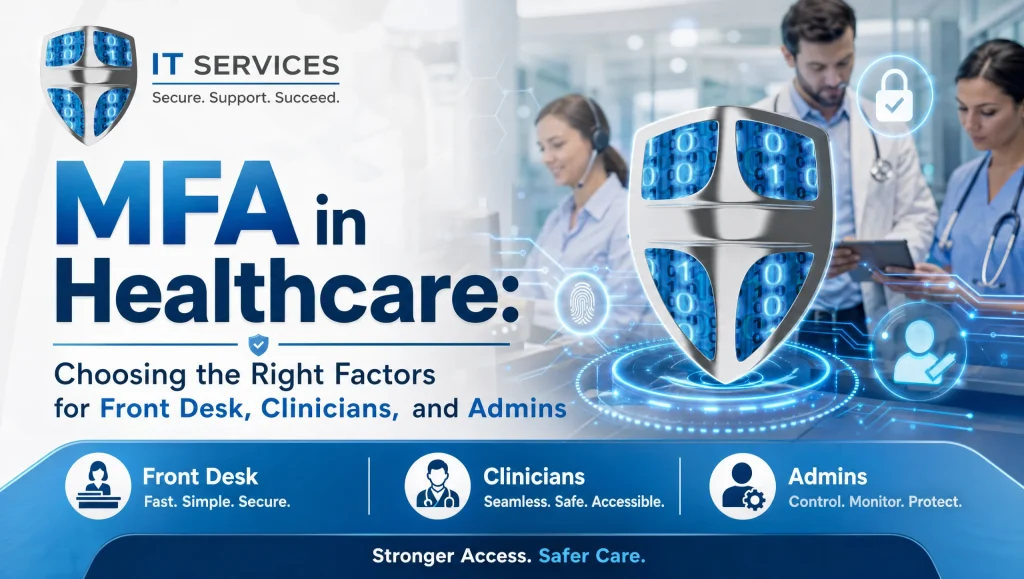
MFA for Healthcare in Houston: Choosing the Right Factors for Front Desk, Clinicians, and Admins
Multi-factor authentication (MFA) for healthcare adds a second verification step—such as a hardware key, authenticator app, or badge—when staff sign in to EHR systems, dental software, or email. When you tailor MFA by role (front desk, clinicians, and administrators), you strengthen identity security, support multi-factor authentication HIPAA safeguards, and cut down on account takeovers without slowing patient care in busy Houston clinics.
Quick options at a glance:
- Front desk: authenticator app or push with number match; FIDO2 key for shared desks; SMS/voice only as a backup
- Clinicians: FIDO2 security keys; badge/proximity plus PIN; push with number match as mobile fallback
- Admins/IT: FIDO2 key plus authenticator app; hardware token backup; stricter sign-in frequency
- Conditional access: step-up MFA for billing/eRx; block unknown devices; trust clinic locations; require compliant devices
- Policy: enroll backups; define break-glass; log/audit access; quarterly reviews
What Is MFA for Healthcare and Why It Matters
Quick definition and core benefits
- MFA verifies identity using two or more factors—something you know (PIN), something you have (security key or phone), or something you are (biometric).
- Core benefits in clinics and dental practices:
- Reduces account takeovers and email compromise that can lead to data exposure
- Supports HIPAA’s “reasonable and appropriate safeguards” by hardening access to ePHI
- Limits the blast radius if a password is phished, guessed, or reused
Identity security in clinical environments
- Shared workstations at front desks and nurse stations mean sign-ins can be observed or left unlocked.
- EHR, dental imaging (Dexis, Sidexis/Sirona), and practice management systems are prime targets for credential theft.
- Fast, glove-friendly access is essential; if MFA feels clunky, people bypass it—or use it incorrectly.
Houston context: local practices, hybrid work, and vendor portals
- Across Greater Houston (including Katy and Sugar Land), many practices run multi-site groups, rely on hybrid admin staff, and allow outside billing/vendors through portals.
- Conditional access is especially valuable here: trust clinic networks while requiring stronger MFA for off-network or after-hours access to reduce risk without adding unnecessary friction.
Role-Based MFA for Healthcare: Front Desk, Clinicians, and Admins
Front Desk
Typical tasks
- Patient check-in/out, insurance portals, billing platforms, phones, messaging, and scheduling
- Frequent movement between the lobby and shared kiosk PCs
Recommended factors
- Authenticator app or push with number match (stronger than simple “approve” prompts and more phishing-resistant)
- FIDO2 security keys for shared desks and kiosks—fast tap-in/tap-out without personal phones
- Backup SMS/voice codes only as a last resort and for short-term recovery
Conditional access ideas
- Require MFA for logins from off-network or unfamiliar devices
- Step up MFA for higher-risk actions like finance/billing access, password changes, and vendor portals
- Allow longer session lifetimes on trusted clinic devices during rush hour, but enforce re-authentication for sensitive apps
Usability tips
- Use number matching for push to prevent “MFA fatigue” approvals
- Enable kiosk/shared-PC modes; pair FIDO2 keys to shared stations with individual accounts
- Keep re-auth intervals balanced—tighter for portals with payments, more relaxed for routine scheduling
Clinicians
Typical tasks
- Rapid EHR access and charting, imaging (Dexis, Sidexis/Sirona), e-prescribing, and chairside logins across operatories and exam rooms
Recommended factors
- FIDO2 security keys for tap-to-sign-in that works with gloves
- Badge/proximity plus PIN where supported for near-instant access to shared clinical PCs
- Mobile push with number match as a fallback—helpful when moving room to room
Conditional access ideas
- Trust location in exam rooms and operatories while still requiring device compliance (managed, patched endpoints)
- Step up MFA for eRx and any controlled-substances platform
- Enforce shorter session lifetimes for systems with prescribing privileges; allow slightly longer sessions for read-only imaging viewers
Usability tips
- Prioritize glove-friendly sign-in (keys/badges) and ensure offline options in poor Wi‑Fi areas
- Configure fast user switching and automatic session lock on key/badge removal to prevent lingering sessions as clinicians move
- Keep spares of FIDO2 keys securely accessible for on-call clinicians
Admins and IT
Typical tasks
- EHR administration, Microsoft 365/Google Workspace admin, backups and disaster recovery consoles, remote access, vendor tools, and privileged changes
Recommended factors
- FIDO2 keys plus an authenticator app for redundancy
- Hardware token backup stored securely (e.g., in a safe), not tied to a single device
- Avoid SMS/voice for admin access; emphasize phishing-resistant factors
Conditional access ideas
- Require MFA at every sign-in for privileged roles and admin portals
- Use privileged access management (PAM), per-app conditional access, and geo restrictions for administrative tools
- Block logins from high-risk or foreign locations; enforce device compliance checks
Usability tips
- Separate admin accounts from daily user accounts
- Use just-in-time (JIT) access for elevated privileges to minimize standing risk
- Maintain clear escalation paths and documented break-glass procedures for emergencies
Matching MFA Factors to Systems You Use
EHR and Dental Software (Dentrix, Eaglesoft, Open Dental)
- Many EHR and dental systems now integrate with identity providers (IdPs) that support MFA and single sign-on (SSO). Favor secure SSO over app-specific passwords.
- Avoid legacy “app passwords” whenever possible—these often bypass MFA. If a system lacks modern authentication, consider gateway solutions or an upgrade path to enable MFA.
- Test sign-in flows so front desk and clinicians can tap a FIDO2 key or use a quick push while maintaining session security as they move between workstations.
Imaging and Specialty Tools (Dexis, Sidexis/Sirona)
- Imaging tools often rely on workstation-bound sign-ins and device trust. Pair MFA with device compliance checks and smart session policies.
- Plan for offline contingencies—if the imaging room’s Wi‑Fi is spotty, a FIDO2 key or badge plus PIN avoids reliance on a phone signal or push notifications.
Cloud Email, PMS, and Billing Portals
- Use SSO for Microsoft 365 or Google Workspace with conditional access baselines: block unknown devices, require compliant endpoints, and enforce MFA off-network.
- For billing and patient payment portals, enable step-up MFA and session timeouts that reflect higher fraud risk.
- Choose phishing-resistant MFA (FIDO2/WebAuthn or number-matched push) over SMS codes whenever possible.
HIPAA, Policy, and Audit Considerations
Multi-factor authentication HIPAA alignment
- HIPAA doesn’t mention “MFA” by name, but it expects “reasonable and appropriate safeguards” for protecting ePHI. MFA is widely recognized as a practical control that reduces credential compromise.
- Document your rationale: where MFA is enforced, which factors are allowed, and how those choices support your access control standards.
Documented MFA policy
- Enrollment: how staff register primary and backup factors (e.g., FIDO2 key plus authenticator app)
- Break-glass: emergency access procedures with audit trails and immediate post-event reviews
- Lost/stolen device: immediate disablement, temporary break-glass access, and re-enrollment steps
- Audit: maintain logs, set alerts for suspicious sign-ins, and periodically test controls
Quarterly access reviews and log monitoring
- Review role assignments, inactive accounts, and least-privilege access every quarter
- Monitor sign-in risk, impossible travel, and repeated MFA prompts that may indicate phishing or fatigue attacks
Conditional Access That Fits Your Clinic
Examples by risk
- Off-network logins: always require MFA; consider stronger factors for personal devices
- Unfamiliar or non-compliant devices: block access or require remediation before allowing sign-in
- High-risk apps: finance/billing portals, admin consoles, and eRx systems should get stricter re-auth and step-up MFA
Step up MFA when it matters
- e-Prescribing and controlled-substances platforms: enforce hardware-based or phishing-resistant MFA
- Payments and billing changes: require re-auth plus number matching to mitigate social engineering
- Remote admin: use per-app policies and geo restrictions; log and alert on every elevation event
Trusted locations, device compliance, and session lifetime
- Trust the clinic network and known IPs when appropriate—but still require compliant, managed devices for access to ePHI
- Set session lifetime policies by role and app sensitivity (shorter for admin and prescribing, moderate for front desk scheduling)
- Use sign-in frequency controls to reduce fatigue without creating security gaps
Deployment Plan: From Pilot to Practice-Wide
1) Inventory accounts and apps; reduce shared logins
- Map every user, role, and application (EHR, imaging, email, portals)
- Replace shared credentials with named accounts wherever possible; if a shared workstation is needed, pair it with SSO and individual MFA
2) Choose factors per role; define backups and break-glass
- Front desk: push with number match or FIDO2; SMS/voice only as contingency
- Clinicians: FIDO2 or badge plus PIN; push fallback; stage extra keys securely
- Admins: FIDO2 plus authenticator app; hardware token backup; high-frequency re-auth
- Define a break-glass process with tight logging and post-incident review
3) Train teams; simulate MFA fatigue and phishing
- Teach how number matching works and why “approve-only” prompts are risky
- Run short simulations for MFA fatigue and basic phishing; show how to report suspicious prompts
- Reinforce secure habits at shared PCs: quick lock, remove key, or badge out when stepping away
4) Test, monitor, and iterate with helpdesk support
- Pilot with a small cross-section (front desk, a clinician, and an admin). Gather real feedback on speed and usability.
- Adjust session lifetimes and step-up triggers based on actual workflows.
- Ensure a responsive remote helpdesk during rollout so staff never feel stuck or tempted to bypass controls.
Real-World Notes from the Field (CompTSS Houston)
In a Houston dental group we support, we rolled out FIDO2 keys for clinicians and push with number match for the front desk. Clinicians appreciated the tap-to-login at chairside, and front desk staff liked the quick pushes during morning check-in. We paired conditional access to step up MFA only for billing and remote access, which reduced friction without sacrificing security. The lesson: pick factors that match the workflow, then fine-tune session settings to stay out of the way of patient care.
Myth vs. Fact: MFA in Clinics
- Myth: “MFA will slow our front desk during peak hours.”
- Fact: With number-matched push on trusted clinic PCs—and step-up only for billing—most check-ins are as fast as a tap or quick approve.
- Myth: “Clinicians can’t use MFA with gloves.”
- Fact: FIDO2 keys and badge plus PIN options are glove-friendly and typically faster than typing passwords.
- Myth: “SMS is good enough.”
- Fact: SMS can be intercepted or SIM-swapped. Prefer phishing-resistant options like FIDO2 or number-matched push, and keep SMS only as a backup.
Where MFA Meets Your Broader Security Posture
- Pair MFA with device compliance—patched systems, disk encryption, and endpoint protection reduce bypass risks. For a deeper review, consider a cybersecurity audit and Zero Trust approach; see our Ultimate Cybersecurity Audit guide: https://comptss.com/cybersecurity-audit-ultimate-cybersecurity-audit
- Backups and disaster planning ensure you can recover even if an account is compromised. Explore cloud backup best practices and tested disaster recovery: https://comptss.com/cloud-backup-unlock-it-success-cloud-backup-sys
- If you’ve experienced or want to prevent business email compromise or ransomware, align MFA with incident response and recovery planning: https://comptss.com/ransomware-recovery-master-ransomware-recovery
- Need always-on help during rollouts? Our responsive remote helpdesk and 24/7 monitoring support can minimize downtime during changes—especially useful for multi-site Houston groups: https://comptss.com/remote-helpdesk-unlocking-it-support-remote
- For comprehensive healthcare and dental IT support in Houston, including HIPAA-focused cybersecurity and local SEO for patient acquisition, visit: https://comptss.com/
Image note for your web team
- Consider including a simple diagram that maps roles to recommended factors and conditional access triggers. Alt text: “MFA for healthcare role-based factors diagram”
- If you add a visual for policy flow, consider: Alt text: “MFA for healthcare conditional access policy flow for Houston clinic”
- For a device-focused visual, consider: Alt text: “MFA for healthcare FIDO2 key setup for dental EHR in Houston”
Putting It Together: A Role-Based MFA Checklist
- Accounts and roles
- List users and map to front desk, clinician, and admin/IT; remove stale accounts.
- Eliminate shared credentials; use SSO and individual logins.
- Factors and backups
- Front desk: number-matched push or FIDO2; SMS only for recovery.
- Clinicians: FIDO2 or badge plus PIN; push fallback; secure spare keys.
- Admins: FIDO2 plus app; hardware token backup; deny SMS/voice.
- Conditional access
- Step up for eRx, billing, and admin portals.
- Block unknown or non-compliant devices; trust clinic locations as appropriate.
- Tune session lifetimes by role and app risk.
- Policy and governance
- Written MFA policy with enrollment, break-glass, lost/stolen device, and audit processes.
- Quarterly access reviews; alert on risky sign-ins and repeat MFA prompts.
- Training and support
- Short, hands-on training by role.
- Simulate MFA fatigue and phishing; reinforce reporting.
- Provide accessible helpdesk channels during rollout.
When to Get Expert Help
- Risk assessments, MFA policy, and HIPAA documentation
- An experienced partner can align MFA with HIPAA’s expectations, document controls, and structure logs for audits.
- Integrations with EHR/dental software and imaging suites
- Compatibility and SSO planning for Dentrix, Eaglesoft, Open Dental, Dexis, and Sidexis/Sirona benefit from hands-on experience with clinical workflows.
- 24/7 monitoring, backups, and disaster recovery alignment
- MFA is one control in a larger identity security program. Tie it to endpoint protection, tested backups, and recovery runbooks so you’re covered during incidents and after hours.
Conclusion
Role-based MFA for healthcare helps Houston dental and medical teams lock down identities without slowing care. By pairing phishing-resistant factors to each role, enforcing thoughtful conditional access, and documenting HIPAA-aligned policies, you can reduce account takeovers and keep EHRs, imaging, and billing portals protected. If you’d like a calm, practical review of MFA for healthcare and conditional access tailored to your Houston clinic (including Katy and Sugar Land), CompTSS is here to help—reach out for healthcare IT support in Houston that fits your workflows and your team.